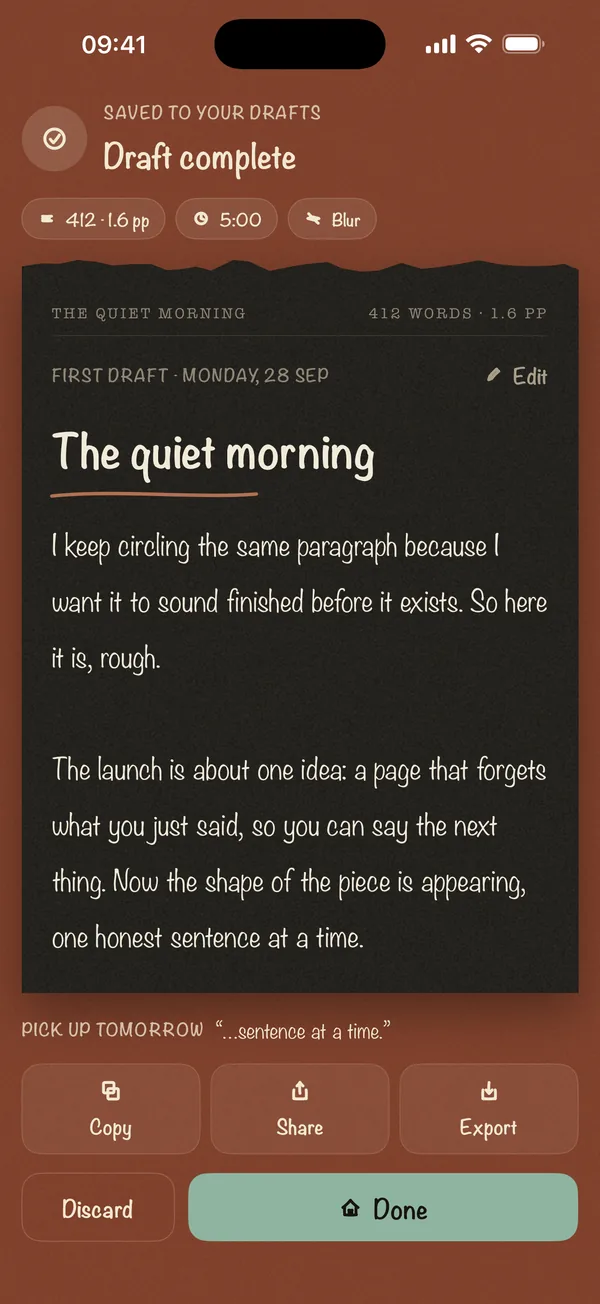
Last Line Only keeps just the line you're typing visible and hides everything above it until the sprint ends. You keep the context of the current sentence without being able to reread earlier paragraphs. It's part of Blind Draft Pro, and free users get one free try.
Last Line Only sits between Blur and Invisible. You see the line you're writing, so you never lose the thread of a sentence, but the moment a line is done, it's gone from view.
How Last Line Only works
- Start a sprint and choose Last Line Only.
- Your current line stays visible as you type.
- When you move to a new line, the previous one is hidden.
- When you reach the goal, the Draft Complete screen shows the full draft.
How it compares with the other blind modes
| Mode | What you see while writing | The catch |
|---|---|---|
| Blur | Earlier text as a soft blur | You can still feel the shape of the page, and some writers squint to decode it |
| Last Line Only | Only the line you're typing | You can't see the paragraph you're in, only the sentence |
| Invisible | Nothing you've already written | Strictest; some writers find it disorienting at first |
What it feels like
Say you're drafting a personal statement. You type "The summer I worked at my uncle's garage, I learned that" and the line stays in front of you while you finish the thought. Press return, and it's gone. The next line starts on a clean page. You can't go back and swap "learned" for "discovered", because you can't see it. You just keep telling the story, which is what a first draft is for.
This works best when your sentences carry their own meaning: essays, emails, speeches and journal entries. For fiction with long dialogue exchanges, Blur may suit you better, because it shows where you are on the page.
Who it's for
- Writers who find Invisible mode disorienting but can still read through Blur
- Long-form drafting where each sentence needs its own context
- Writing sprints where you want maximum speed, timed with something like the word sprint timer
- Anyone fighting the urge to polish the opening line; see how to stop editing while you write
Frequently asked questions
What's the difference between Last Line Only and Invisible?
Invisible hides everything you've written. Last Line Only keeps the current line visible, so you can finish the sentence you're on.
Is Last Line Only free?
It's part of Blind Draft Pro, a one-time purchase. Free users get one free try.
Is my earlier text saved?
Yes. Every word is saved on your device and shown in full when the sprint ends.